
← Back to Launchpad
I.T. Technical Support
Need help with your computer, email, or a system? Open a support ticket and the I.T. team will follow up with you.
Option 1: On a work computer Recommended
If you’re at a work computer, this is the fastest way to get help.
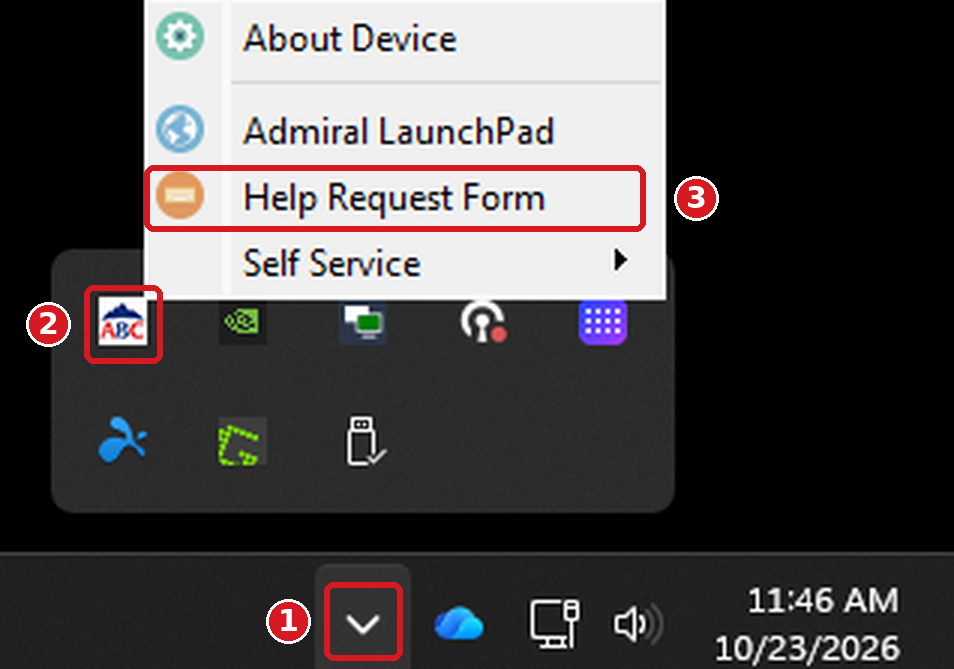
- 1 At the bottom right of your screen, next to the clock, click the small arrow (^) to show hidden icons.
- 2 Right-click the white ABC icon.
- 3 Click Help Request Form, fill it out with a short subject and a description of the problem (include any error message you see), then submit it.
Option 2: On an iPad or phone Recommended
If you’re on an iPad or phone, or can’t get to a work computer, open a ticket by email.
- Send an email to support@admiralbeverage.rmmservice.com.
- Use a short subject that sums up the problem.
- In the message, describe what’s happening and attach a screenshot if you can.
Option 3: Contact I.T. directly Last resort
Only if you can’t open a ticket with Option 1 or 2, email itdept@admiralbeverage.com.
To help us create a ticket without having to follow up, please include:
- Your full name
- Your username (Windows username, route number, etc.)
- Your location (branch or warehouse)
- The best phone number to reach you
- The device having the problem (asset tag number on the device, iPad phone number, route number, etc.)
- What the problem is, when it started, and any error message (a screenshot helps)
Tips for a faster fix
- Include your location and the best phone number to reach you.
- Tell us when the problem started and what you were doing.